Documentation
Architecture, configuration, and commands for the current Solo implementation.
Architecture · Configuration · Multi-server coordination · Commands · Connection doctor · Proxy API · Drain and timeouts
Solo architecture
This describes the current source tree, including unfinished components. It is not a claim that every supported path has been validated in production.
Components
| Component | Responsibility | Status |
|---|---|---|
solo | Local configuration/state, build orchestration, SSH, image delivery, deployment, reconciliation, and inspection | Active operator interface |
solo-proxy | HTTP/HTTPS ingress, host/path routing, readiness probes, active/previous backends, draining, watchdog, runtime health, and metrics | Runs on target servers |
SoloRegistry | Embedded registry used by native Swift image builds and temporary server pulls | Project-local, command-managed |
Commander / SSHClient | Local/remote command execution and SSH transport | Shared libraries |
solo-cp | Intended central control plane | Scaffold; not wired into the normal deployment path |
| Cluster coordination | Single ACME owner, SSH peer service, certificate checkpoints, manual promotion, and central monitoring | Implemented in current source; automatic election is not provided and live topology validation is still required |
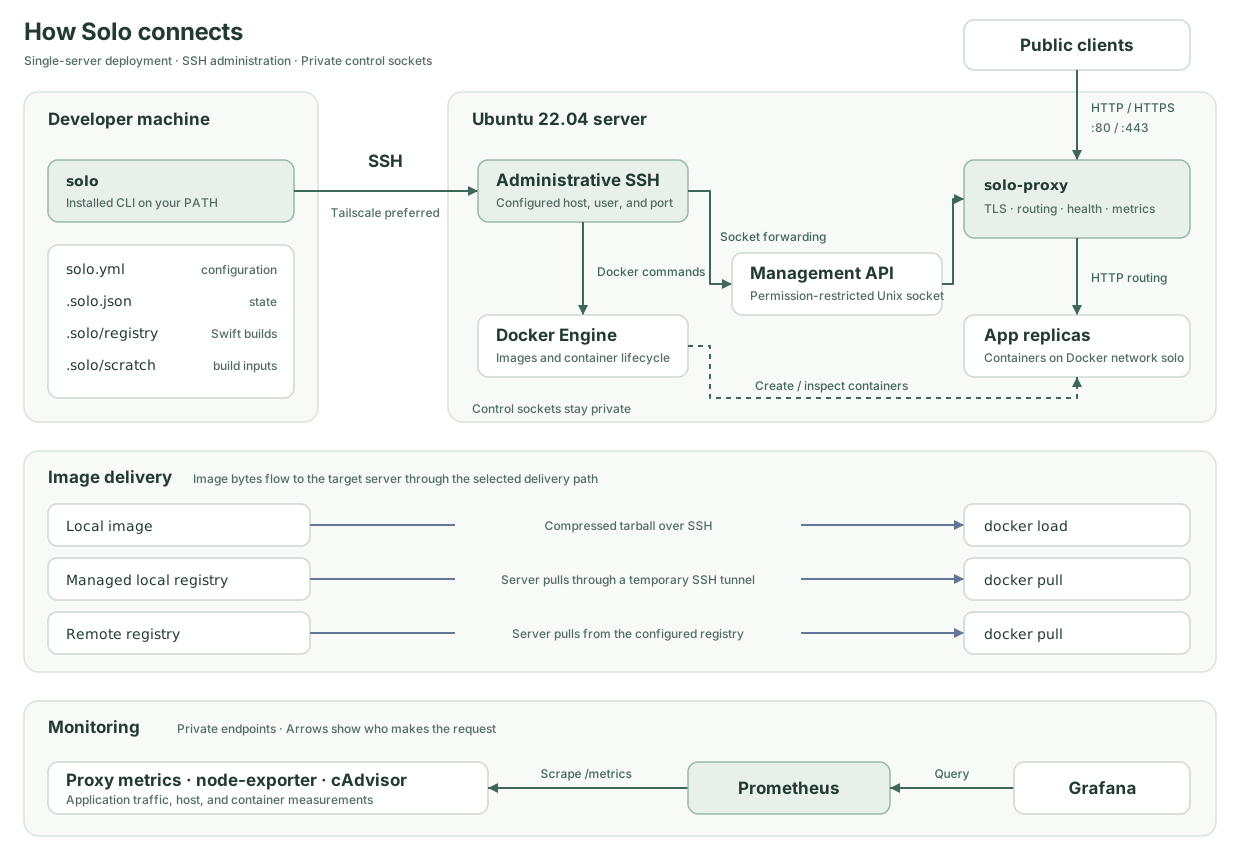
The CLI orchestrates deployments over SSH. Optional cluster mode installs a persistent solo-cluster peer service on each server for TLS and monitoring; it does not schedule app deployments. Neither mode uses Swarm services. Server state still uses historical names such as DockerNode; that does not imply Swarm orchestration.
Build and image delivery
solo build produces recorded artifacts; solo deploy selects a recorded build, not fresh source. Clean source uses the commit as its build identity; dirty/dev source is marked separately. Image tags and deployment release labels are separate from the source commit.
- Dockerfile builds archive committed
HEADcontent. Uncommitted/untracked files are excluded. The current Dockerfile builder is incomplete; see the limitations below. - Native Swift builds copy working source into
.solo/scratch/<service>, excluding.git,.build, and.solo, then invokeswift package build-container-image. A matching toolchain/SDK and container plugin are required. - Command/script builders execute in the service context directory and use the final nonempty stdout line as their image reference. They control their own source inclusion and publishing behavior.
- Managed local registry resolution currently applies to
swiftPackageContainer; it is not a universal delivery mode for every builder. Missing remote configuration gives Swift a registry under.solo/registry. - Without a registry-backed source, non-Swift image delivery saves a local image, uploads a compressed tarball, and loads it on each server.
- Remote registry workflows publish/prefetch via
solo build pushas needed before deployment. Merely configuring a remote registry does not prove an image has been published.
Routed deployment lifecycle
- Select the service and latest recorded build; show identity, image, and build time. Interactive text mode asks for confirmation unless
--last-buildis passed. - Filter configured servers by service placement and optional
--server. Inspect active state; matching image/environment/replicas can be skipped. - Deliver the image, create new app containers on the shared Docker network, and register targets with the proxy's management API.
- Wait for readiness delay and require HTTP 200 from every target's health path (default
/up) within the deploy timeout. Failure leaves the existing backend active. - Atomically select the new backend for new requests, then drain in-flight requests on the previous backend up to the drain timeout.
- Unless
--forceis used, observe request errors during the watchdog window. The current defaults are a 60-second window, 5-second checks, and rollback above a 5% error rate. It can confirm after 100 requests; low traffic extends the window once, then may confirm with a warning. - Confirmation clears the previous routing backend. The CLI follows runtime status, updates deployment expectations/journal, and cleans stale containers/images.
--last-build changes build confirmation; --force bypasses watchdog observation. They have different effects. No rollback system can undo database migrations automatically.
State and paths
| Location | Meaning |
|---|---|
solo.yml | Declarative servers and services; use services, not legacy apps |
.solo.json | Local project UUID, builds, credential references, deployment book and preferences |
.solo.lock | Local process lock; alternate config basenames have corresponding state/lock filenames |
.solo/registry | Managed Swift image registry data |
.solo/scratch | Native Swift build workspaces |
/var/lib/solo/proxy | Server proxy data, certificates, and route state |
/var/lib/solo/proxy/runtime/proxy.sock | Host management socket |
/run/solo/proxy.sock | Proxy-container management socket; compatibility mount also exists at /var/lib/solo-proxy/runtime |
/var/lib/solo/apps/<service> | Per-app state, environment/current/previous files, deploy lock and journal |
/etc/solo-monitoring | Generated Prometheus/Grafana provisioning |
/var/lib/solo-monitoring | Monitoring data |
/var/log/solo-proxy | Proxy general/access logs |
Standalone solo-proxy defaults differ by platform: Linux uses /var/lib/solo/proxy with a runtime/proxy.sock; macOS uses /tmp/solo-proxy and /tmp/solo-proxy/proxy.sock. The installer passes explicit container paths.
Configuration should be versioned. Local state needs deliberate backup and review before sharing: it may include legacy registry credentials or other sensitive metadata. Secret-store references are local identities, not a portable team credential bundle. App env remains literal configuration and is materialized on the server.
Networking and monitoring
Only the proxy publishes HTTP/HTTPS in the standard routed setup. Explicit service expose ports can publish additional TCP/UDP ports; review those and their firewall rules separately. Proxy management uses a permission-restricted Unix socket reached via SSH, not a public HTTP control port.
Prometheus and Grafana bind to 127.0.0.1:9090 and 127.0.0.1:3000 on the server. Proxy metrics on 9091 are available inside the Docker network. Monitoring includes node exporter and cAdvisor, provisioned dashboards, and 72-hour Prometheus retention. In optional cluster mode, exporters run on every member while Prometheus/Grafana stay on the configured monitoring server and collect through private peer relays. solo stats reports endpoints and runtime status. Grafana starts with admin/admin; change it on first login.
When local and remote Tailscale are connected, monitoring installation attempts to configure private Grafana access using Tailscale Serve on HTTPS port 8443. Otherwise use an SSH tunnel. solo server tailnet verifies a fresh tailnet SSH connection before removing the generic public SSH rule; host stays the server identity and ssh_host becomes its administration address.
TLS and multi-server boundaries
Public initialization requires servers[].domain, working DNS, and inbound 80/443. It waits for HTTPS readiness and fails initialization if HTTPS is unavailable. A deliberate HTTP-only setup omits the server domain and passes --http-only.
Service routing uses proxy.host or a service domain, with server-domain fallback where applicable. Service hosts must match the server domain or be its subdomains. A wildcard DNS record does not mean Solo issues a wildcard certificate; ACME obtains certificates for concrete hosts. Multiple configured hosts are not a promise of one shared SAN certificate.
Optional cluster.monitoring_server enables cluster preparation: a restricted SSH peer service, pinned host keys/tokens, one ACME owner, challenge forwarding, certificate checkpoint synchronization/reload, and central monitoring. solo cluster status discovers ownership; solo cluster promote <server> performs a manual handoff to a ready standby. An unreachable former leader must first be externally fenced; the assertion flag does not perform fencing. There is no automatic leader election. The source implements shared-domain coordination, but this documentation update does not verify a live multi-server topology. Begin with one server, then follow the cluster guide before relying on shared-domain balancing.
Current limitations
- Provisioning accepts Ubuntu 22.04 only and currently relies on password-based SSH paths. Host-key verification is inconsistent across transports.
- The default Dockerfile builder is unfinished: its Docker branch is a placeholder and its Podman push step contains an unfinished image reference. Use the explicit command/script path in the guide.
- Command/native Swift build records currently mark platforms as amd64; avoid promising transparent heterogeneous-fleet builds.
- Health-monitor recreation does not yet preserve all mounts/resource settings. Do not depend on it for recovery of stateful containers.
- Automatic rollback is an observation-window mechanism. There is a proxy-level
rollback, but no registeredsolo app rollback <release>or arbitrary historical restore workflow. - Multi-server rollout is sequential, without configurable batch/concurrency/failure policies. Cluster TLS/metrics coordination and manual promotion are implemented, but automatic election/fencing are not; verify recovery on a live topology before relying on it.
- No general deployment hooks, dedicated app exec, runtime command overrides/accessory lifecycle, named environment overlays, or app secret interpolation.
- Proxy replacement during install/upgrade can interrupt traffic. Health-gated app switching is not a blanket zero-downtime guarantee for every operation.
Track completion and acceptance criteria in compare.md.
Configuration reference
solo.yml describes servers and services. solo --config path/to/staging.yml ... selects another configuration and uses its directory as the working directory. Alternate basenames have separate state/lock files; named destination overlays are not implemented.
Example
project: my-project
servers:
  - host: 203.0.113.10
    ssh_user: root
    ssh_port: 22
    domain: example.com

services:
  - name: api
    port: 8080
    replicas: 2
    servers: [203.0.113.10]
    env:
      LOG_LEVEL: info
    resources:
      cpus: "0.5"
      memory: "512m"
    volumes:
      - /var/lib/my-api:/app/data
    builder:
      type: swiftPackageContainer
      sdk: x86_64-swift-linux-musl
      product: MyServer
      swiftCommand: swift
    proxy:
      host: api.example.com
      app_port: 8080
      ssl: true
      ssl_redirect: true
      healthcheck:
        path: /up
      responseTimeout: 30
      drainTimeout: 30
      deployTimeout: 10
      readinessDelay: 7
      maxRequestBodyMb: 50
      maxClientConnections: 1024
      drainGraceSeconds: 10
This requires a package using swift-container-plugin and a matching SDK/toolchain. Volumes persist data on the selected host; they do not provide replication, backup, or safe recovery through the current health-monitor recreation path.
Servers
| Key | Default | Meaning |
|---|---|---|
host | Required | Public identity used for placement and routing |
ssh_host | host | Separate administration address, such as a Tailscale IPv4 address |
ssh_transport | Address hints for older configs; otherwise direct | tailscale checks local connectivity before credential reads/SSH; direct bypasses address inference |
peer_ssh_host | Administration address fallback | Optional SSH fallback for cluster peer connections; connected Tailscale addresses are preferred |
ssh_user | root | SSH user; provisioning currently expects root privileges |
ssh_port | 22 | SSH port |
domain | None | Server domain for initial HTTPS; required unless explicitly using --http-only |
The decoder also accepts sshHost, sshUser, and sshPort; serialization uses snake_case. Do not confuse host (server identity) with proxy.host (HTTP routing hostname). The server domain bootstraps proxy HTTPS; explicit application hosts may use other domain names that resolve to the server. Each hostname needs its own valid certificate and route.
Services
| Key | Default | Meaning |
|---|---|---|
name | Required | Service identity |
image | Derived from name/registry user | Image repository naming; custom builders return their own final image reference |
dockerfile | Dockerfile | Input for the currently unfinished native Dockerfile builder |
context | Config directory | Service build directory relative to the configuration |
port | 3000 | Application port; injected as PORT in the runtime environment |
servers | All configured servers | Allowlist of server host identities |
replicas | Effective default 1 | Desired count per eligible server, not a fleet-wide total |
env | Empty | Literal environment values; no automatic secret-store interpolation |
resources.cpus | None | Positive CPU quota as a string, e.g. "0.5" |
resources.memory | None | Docker memory limit, e.g. "512m" |
volumes | Empty | Docker mount strings, e.g. /host/path:/container/path:ro |
domain | None | Legacy/convenience route input; prefer explicit proxy.host |
Configuration uses services; the CLI still calls service management solo app. For a full setup start with the guide, which handles the unfinished default builder explicitly.
Proxy routing and limits
Key under proxy | Default | Meaning |
|---|---|---|
host | Resolved from service/server domain | A hostname or list of hostnames |
ssl | true | HTTPS intent |
ssl_redirect | true | Redirect plain HTTP when HTTPS is enabled |
app_port | Service port | Upstream application port |
healthcheck.path | /up | Readiness path; must return HTTP 200 |
path_prefix | None | Match this request-path prefix; no strip-prefix configuration is exposed |
maxRequestBodyMb | 50 | Ingress body limit in MiB |
responseTimeout | 30 | Request timeout in seconds |
drainTimeout | 30 | Old backend drain wait in seconds |
deployTimeout | 10 | New backend readiness timeout in seconds |
readinessDelay | 7 | Delay before probing in seconds |
maxClientConnections | 1024 | Per-host concurrent-client limit |
drainGraceSeconds | 10 | Graceful container-stop window in seconds |
Timeout/limit keys are camelCase, not deploy_timeout or response_timeout. Host + path-prefix combinations must be unique across services. Multiple route hosts do not imply a single shared SAN certificate. Omit explicit hosts and the server domain only for intentional HTTP-only catch-all testing.
Live overrides use solo proxy config set responseTimeout 60 --app api; persist the same value in YAML when it should survive future deploy/reconcile operations.
Published ports
Routed applications normally need no public app port. Optional explicit bindings use:
expose:
  ports:
    - host_port: 8125
      container_port: 8125
      proto: udp
The single-port form accepts host_port, container_port, and proto directly under expose. Explicit ports are separate from proxy ingress and require appropriate firewall review; a binding alone does not establish public reachability.
Builders
builder.type | Fields | Behavior |
|---|---|---|
swiftPackageContainer | sdk, product, repository, swiftCommand | Native container plugin; default SDK x86_64-swift-linux-musl, product defaults to service name, command defaults to swift |
command | command | Inline shell; last nonempty stdout line is the image reference |
custom | script | Executable script relative to service context; same output contract |
dockerfile | Service dockerfile / context | Generated default, but its native implementation is unfinished; use command/script until fixed |
Scripts control their own build source and publish behavior. Keep the returned image available locally for tarball delivery or publish it to a configured remote registry. Native Swift builds use a scratch copy and can write to Solo's managed registry without a Docker daemon.
Registry
Omit registry for default behavior: native Swift builds use the managed local registry; other builders use local-image tarball delivery. An explicit local registry currently applies to swiftPackageContainer only:
registry:
  type: local
  host: 127.0.0.1
  port: 5000
  data_dir: .solo/registry
A remote registry configuration:
registry:
  type: remote
  url: https://registry-1.docker.io
  user: your-user
type can be inferred from a nonempty url. The default port is 5502, and default registry data is stored in .solo/registry/data; 5000 above is an explicit override. The managed registry is exposed read-only for the relevant app repository during temporary SSH-tunneled server pulls. It is not a permanently published server registry.
Secrets and state
SSH credentials and explicitly stored secrets can use macOS Keychain or gopass. solo secret set --namespace demo --key token stores a value; it does not automatically inject that value into services[].env. App environment configuration is literal and is written to server state files.
Do not put credentials in versioned YAML. Review .solo.json before sharing: not every legacy credential path is guaranteed to contain references only. See state and paths and the gap tracker.
Optional cluster coordination
cluster.monitoring_server selects a configured server identity for central Prometheus/Grafana and initial TLS leadership. Server initialization prepares private peer transport, certificate synchronization, and the selected monitoring location. Later manual TLS promotion does not move monitoring. See the cluster guide for configuration, protocol requirements, transport paths, and recovery boundaries.
For Cloudflare DNS/proxy records, TLS mode, challenge routing, and certificate coverage, see Cloudflare configuration.
Multiple Solo servers
Solo keeps monitoring placement separate from TLS ownership. The monitoring server runs Prometheus and Grafana. One TLS owner obtains and renews certificates for the cluster, while each proxy terminates HTTPS using its own local certificate cache. There is no automatic election. Most deployments can start with one server and add an application server when needed.
Configuration
Standalone configurations keep their existing behavior. To enable coordination, name the monitoring server explicitly using its configured host:
cluster:
  monitoring_server: 203.0.113.10
servers:
  - host: 203.0.113.10
    ssh_host: 100.64.0.10
    peer_ssh_host: 203.0.113.10
    domain: app.example.com
  - host: 203.0.113.11
    ssh_host: 100.64.0.11
    peer_ssh_host: 203.0.113.11
    domain: app.example.com
The monitoring server is the initial TLS owner. Subsequent provisioning preserves the current owner, including after a promotion or reordering servers. peer_ssh_host is an optional host-to-host SSH fallback address. Solo prefers each host's discovered Tailscale IPv4 address. Without an explicit fallback, it uses host. Solo never opens public SSH rules as a fallback; the chosen address must already be reachable between servers.
Join servers to Tailscale using the existing solo server tailnet workflow before provisioning cluster peers, or rerun provisioning after joining them.
Provisioning
Build and publish the matching solo-proxy:v0.2.0 image first, following publishing instructions. Cluster setup checks the image's clusterProtocol: 1 capability before adopting ownership. The source CLI targets this image; this repository change does not publish it.
Run solo server init, or solo proxy install for already provisioned servers. Provisioning connects to every configured member to pin SSH host keys and install peer credentials, so every member must be reachable during setup. Ubuntu 22.04 hosts need Python 3, OpenSSH, OpenSSL, and systemd. Peer coordination runs under solo-cluster.service independently of the local CLI. No local CLI process needs to remain running.
Each peer has a dedicated SSH key and pair-specific HTTP credentials. The solo-peer account has no command execution, TCP forwarding, agent forwarding, or sudo access. SSH forwards a private Unix socket accessible to that account; management sockets and credentials remain root-only. No coordination port is published publicly. Prometheus and Grafana remain bound to host loopback.
All eligible TLS owners receive a root-only standby checkpoint containing the ACME account key and certificates needed for takeover. Only domains assigned to a server are activated in its serving cache. Treat every cluster member as trusted infrastructure capable of becoming the TLS owner.
All proxies must be reachable on port 80 for HTTP-01 validation. Point shared app DNS at provisioned proxies. Initial migration stops older proxies that do not understand ownership locks; schedule that first migration as maintenance. Cluster proxies keep HTTP challenge listeners available while waiting for certificates. HTTP-01 requests landing on followers are forwarded privately to the TLS owner.
Every node gets proxy, host, and container metrics. Only the monitoring server gets Prometheus and Grafana. Membership changes update Prometheus file-discovery targets without recreating an established central Prometheus container. Historical data on former standalone monitoring hosts is retained on disk, but is not merged. Use --no-monitoring with proxy install to skip monitoring provisioning.
solo reconcile --dryrun and solo reconcile --json remain read-only. An applying reconcile refreshes cluster provisioning and monitoring before reconciling apps.
Discovery and promotion
solo cluster status
solo cluster status --json
solo cluster promote 203.0.113.11
The CLI queries configured servers over SSH, detects conflicting cluster identities or owners, and uses the latest ownership generation. Runtime peers follow a leader hint and confirm it with that server. Discovery cannot activate a new owner.
Promotion checks the standby and its checkpoint, waits for the former owner's in-flight ACME operation to finish, persists its demotion, then takes a final checkpoint. The destination validates and restores the checkpoint before becoming the owner. Prometheus stays in place. A planned proxy upgrade attempts this handoff when a ready standby exists; otherwise it reports that issuance will pause.
If a handoff is interrupted after demotion, issuance remains paused. Rerun the same promotion destination to complete it; cluster status reports the pending target.
For an unreachable former owner, stop or fence it externally before running:
solo cluster promote 203.0.113.11 --former-leader-fencedThat flag is an operator assertion, not a fencing mechanism. Stopping only a container with an automatic restart policy is insufficient. Keep the former owner powered off, or stop both its proxy and solo-cluster.service and prevent restart until ownership has been synchronized. A generation number alone cannot stop an isolated process from contacting ACME.
Followers pull changed certificates about every five minutes with jitter, and poll promptly when a new domain needs a certificate. Existing HTTPS continues from cached certificates while the owner is unavailable. A new domain cannot deploy successfully until its certificate is available. Bad or incomplete updates leave the previous serving bundle in place.
After an agent restart, a multi-server owner must confirm its ownership with a reachable peer before issuing. Existing HTTPS can start from cache without this confirmation. Manual activation authorizes the running agent to issue while the fenced former owner is offline; restarting that agent requires peer confirmation again. Two-server deployments intentionally pause issuance when authority cannot be established. Monitoring relocation and membership removal require a separate operator-managed migration; provisioning rejects those changes.
Diagnostics and tests
Use solo stats for monitoring placement, solo proxy tls for certificate expiry, solo cluster status for ownership and last successful synchronization, and journalctl -u solo-cluster for peer connection failures. Private keys and bearer credentials are excluded from agent logs. Files live under /var/lib/solo/proxy/cluster; keep root-only checkpoint backups.
swift test
PYTHONDONTWRITEBYTECODE=1 python3 -m unittest discover -s Tests/ClusterRuntime -v
The peer agent is embedded in the CLI binary. After editing peer.py, regenerate its Swift embedding with python3 Sources/solo/Cluster/Resources/generate_swift.py.
Automated runtime tests use temporary local certificates and sockets. A production rollout still needs a two-host Ubuntu/OpenSSH/Tailscale smoke test and HTTP-01 validation against Let's Encrypt staging. No production certificates are requested by the test suite.
Command reference
Use solo --help and solo <command> --help for installed-version details. Root options are --config, --verbose (-v), --trace (-t), and --version.
Project and builds
| Command | Purpose |
|---|---|
solo version / solo --version | CLI version, target proxy version, supported server OS |
solo init --interactive | Generate configuration and detect a builder; --no-comments omits generated comments |
solo info | Inspect local build environment |
solo build / solo build create [app] | Build all services or a named service |
solo build ls | List recorded builds |
solo build push [app] | Publish/prefetch the latest recorded image; does not start the service |
solo deploy --app api | Deploy a recorded build; alias of solo app deploy |
The native Dockerfile builder is unfinished. Use the explicit builder in the guide. build info also exposes build-environment inspection.
Deployment and services
solo deploy --app api --server 203.0.113.10
solo deploy --app api --last-build
solo deploy --app api --release-tag launch-1 --json
solo app ls
solo ps --json
solo logs --app api --lines 100 --no-follow
solo app journal --app api --lines 50 --json
solo app pause --app api
solo app resume --app api
solo app stop --app api --drain --drain-timeout 30
solo app scale --app api 2 --cpus 0.5 --memory 512mdeploydoes not build automatically.--last-buildskips the build-selection prompt; other setup/delivery decisions may still prompt in text mode.--forceskips the watchdog window and confirms immediately. It is separate from--last-build.app lslists configured services.psinspects running app containers and resource usage.logs(aliastail) andapp tailstream logs;--containercan be repeated to select exact containers.app stopstops routing and leaves containers running.app resumerestores routing.app scalechanges live replicas and can override CPU/memory; update YAML desired state separately.--keep old|newselects which containers to retain when downscaling.app kill --container <container>kills a specified container. Use its installed help before targeting it.- There is no registered
solo app logs,solo app restart,solo app exec, orsolo app rollbackcommand. Proxy-level rollback is limited to an available previous backend.
Example: running containers
Captured from an actual solo ps run. Container IDs and the local machine/user prompt are omitted. Container names retain the terminal's original truncation; resource values and relative times change between runs.
$ solo ps
APP          RELEASE        CONTAINER                 STATE    RESTARTS  LAST HEALTHY  STARTED         DURATION    CPU    MEMORY
------------------------------------------------------------------------------------------------------------------------------------------
proxy        -              solo-proxy                running  0         -             26-11-08 12:21  28 minutes  0.00%  33.92MiB (3.57%)
solo-docs    26-11-08-1211  solo-docs-dirty-26-11-    running  0         7s ago        26-11-08 12:12  36 minutes  0.00%  2.488MiB (0.26%)
swift-hello  26-11-08-1202  swift-hello-dirty-26-11-  running  0         7s ago        26-11-08 12:02  46 minutes  0.03%  9.195MiB (0.97%)
3 containers
LAST HEALTHY is the last recorded successful health check. A dash means no value was reported for that row; it does not by itself indicate a failure. STATE describes the container, while CPU and memory show the captured resource usage.
Servers and private administration
solo server init
solo server init --force
solo server init --http-only
solo server ls
solo server exec --hosts 203.0.113.10 "docker ps"
solo server fw
solo server fw ban 198.51.100.20
solo server fw unban 198.51.100.20 --jail sshd
solo server tailnet 203.0.113.10 --auth-key-file /path/to/tailscale-auth-key
Initialization supports Ubuntu 22.04 LTS. Normal initialization requires a server domain with working DNS and HTTPS; --http-only requires no server domain. --force reconciles an already recorded server.
--hosts is a comma-separated selector on server exec/firewall commands; many other commands use singular --server. Tailnet migration uses regular password-authenticated SSH over Tailscale and verifies a fresh connection before removing the generic public SSH rule. See firewall and private administration.
Proxy and monitoring
solo proxy
solo proxy --json
solo proxy install
solo proxy install --no-monitoring
solo proxy upgrade
solo proxy tls
solo proxy config show
solo proxy config set responseTimeout 60 --app api
solo proxy log access --no-follow
solo proxy log general --server 203.0.113.10
solo stats
proxy defaults to proxy ls. proxy config defaults to show; the correct setter is solo proxy config set, not solo proxy set. Live changes should also be reflected in YAML to preserve desired state. proxy tail is an alias for proxy log.
proxy install installs monitoring unless --no-monitoring is supplied. HTTP-only proxy install/upgrade requires --http-only and no server domain. Replacing a proxy container can interrupt traffic.
stats reports endpoint locations, runtime status, and a proxy health summary; use Grafana for dashboards. It currently prints loopback URLs/tunnel guidance without discovering the Tailscale Serve URL. When Serve is configured, open https://<server-tailnet-name>:8443 directly from your tailnet; no SSH tunnel is needed. See private monitoring access.
Reconciliation and ownership discovery
solo reconcile --dryrun
solo reconcile --app api --server 203.0.113.10 --json
solo reconcile
solo cluster status --json
solo cluster promote 203.0.113.20
reconcile --dryrun reports drift and a plan without applying it. --json also reports without applying. Plain reconcile offers to apply the plan. This is an operator command, not a background scheduler.
cluster status discovers ownership documents and rejects conflicting owners. With cluster.monitoring_server, provisioning prepares private TLS/monitoring coordination; cluster promote <server> performs a manual TLS handoff to a ready standby. It does not move monitoring or provide automatic election. See the cluster guide before promotion, especially if the former leader is unreachable.
Secrets and JSON
solo secret ls
solo secret set --namespace demo --key token --info "API token"
solo build ls --json
solo ps --json
solo stats --json
Secret input is prompted interactively or read from stdin. Stored secrets do not automatically interpolate into app env.
Many commands return a JSON envelope containing command, ok, timestamp, data, and optional warnings/errors. Inspect each command's installed help; JSON is not universal. logs, app tail, proxy log/tail, and server exec reject --json, including when --no-follow is used. Configure credentials before unattended deployment and inspect per-server outcomes.
Connection diagnostics
Use solo doctor, solo doctor --server <host>, or solo doctor --json. --no-doctor disables automatic probes on supported connection-error paths. See doctor behavior and current limits.
Connection doctor
Run solo doctor to inspect administrative SSH, private peer paths, TLS, and monitoring. Use solo doctor --server <configured-host> to focus on a server and its discovered TLS owner and monitoring dependencies. Use --json for a structured report and --timeout 60 to set the total budget (up to 300 seconds). At most four probes run concurrently, each bounded to five seconds. The command reads project configuration/state without taking the project lock or changing the working directory.
solo doctor
solo doctor --server app-server.example.com
solo doctor --json
solo doctor --server app-server.example.com --timeout 10
What the report verifies
The report shows directed connections. A working follower-to-owner connection does not prove the reverse works. It separates the TLS owner from the monitoring host and displays each observed connection's transport, address, service, and timestamp. An unavailable observation stays unknown; preferred candidates are not presented as the active address. Address-range and MagicDNS checks are labelled as hints.
Updated cluster agents report authenticated peer status, actual SSH tunnel addresses, ownership generations, paused handoffs, certificate synchronization age, remote Tailscale state, Docker container status, proxy socket/TLS readiness, and certificate expiry. Prometheus target checks distinguish healthy, down, unverified, and missing configured scrapes for proxy metrics, node-exporter, and cAdvisor. Raw scrape errors, credential-bearing URLs, and certificate keys are excluded from the report.
Older agents advertise incomplete capabilities instead of silently passing checks they cannot perform. For standalone hosts or unavailable telemetry, a read-only platform probe inspects Docker, proxy management, and local Prometheus through the administrative SSH connection. It does not install an agent or change software.
Credentials and deadlines
Probes use Solo's existing password-authenticated SSH client. Automatic diagnosis can use the credential already available to the failed command. Explicit doctor runs can read stored macOS Keychain passwords only when no authentication UI is required. Other providers that lack a noninteractive reader, inaccessible secrets, and missing credentials remain unverified; the doctor does not prompt, unlock a keystore, or save credentials. A TCP-only probe can still establish reachability.
Each native SSH probe runs in an isolated subprocess. Its input, including any password, travels through stdin, never command arguments, environment variables, or logs. Process deadlines bound DNS resolution, secret reads, authentication, and remote execution; cancellation terminates owned probe processes.
Solo's administrative SSH client currently does not enforce known-host checking. The report states that policy rather than claiming host identity was verified. Cluster peer tunnels retain their separate pinned-key policy. Python 3 is required locally and on supported Ubuntu hosts; no local OpenSSH key/agent is needed for the doctor's administrative password probes.
Diagnosis after failures
Operational server, app, proxy, build-push, initialization, and tailnet connection failures use the shared doctor. Known proxy transport failures are diagnosed after the compatibility socket fallback fails. Ordinary HTTP rejections and application readiness failures do not automatically become network diagnoses.
Automatic diagnosis runs at most once per invocation with a shared five-second budget. --no-doctor disables those automatic probes. Original errors and command failure behavior remain intact; JSON envelopes can include an optional diagnostics field. Streaming connections use their own immutable diagnostic snapshots rather than sharing mutable project state between tasks.
The doctor does not install software, open firewall rules, restart services, fetch private certificate bundles, issue certificates, or change ownership. Advice identifies the affected path and supported next checks. It never bypasses pinned keys, recommends public SSH access as a generic fix, or promotes an owner.
Exit status is 0 when required checks pass, 1 when required paths fail or remain unverified, and 2 for invalid arguments/configuration. Missing optional monitoring is a warning. Lack of credentials, permissions, unsupported telemetry, and timeouts are incomplete evidence, not proof that a network connection is broken.
Live multi-host Tailscale qualification remains separate from the automated tests. The local suite exercises native stalled SSH handshakes, missing credentials, process cleanup, directed target health, schema compatibility, and redaction.
Checks learned from live qualification
Servers migrated with solo server tailnet now persist ssh_transport: tailscale beside ssh_host. solo server shows the administration address and transport. Local Tailscale must report Running before operational commands read the SSH password or open a tailnet connection. If a matching peer is explicitly offline, Solo stops with a specific error; missing peer telemetry alone is not treated as proof of failure. Public SSH is never an automatic fallback. Older configurations infer Tailscale from its address ranges/MagicDNS names; ssh_transport: direct overrides that inference.
Doctor applies the same prerequisite before launching an administrative probe. It also performs independent public HTTPS checks for configured application hosts and their readiness paths. These checks verify hostname/certificate trust and exercise HTTP/1.1 and negotiated HTTP/2 separately. A certificate on disk, a working management socket, or a passing HTTP/1.1 request cannot substitute for those checks. A response such as HTTP/2 400/505 at an otherwise healthy app is reported as a readiness failure. Public probes require local curl with HTTP/2 support and share the existing deadline/concurrency limits.
The standalone platform probe compares Solo's Docker API version with the daemon's supported minimum/maximum and checks that /solo-proxy exists inside the installed proxy image for CLI management fallback. These catch the incompatible API and image layout found during qualification. A newly built local binary may need Keychain approval; doctor reports unavailable noninteractive credentials and does not mislabel that as failed server authentication.
With Cloudflare or another CDN, public DNS checks inspect the edge path. They do not independently prove the origin certificate is correct. Use the separate origin checks in Cloudflare configuration. Doctor does not create temporary ACME tokens, issue a test certificate, or inspect Cloudflare dashboard rules/API credentials.
For the live Solo website, the source of truth is solo.jsmp.me/solo.yml. Run solo server and solo doctor from that folder. Its ignored state and managed registry reside beside the configuration; the qualification/ folder holds historical evidence only.
solo-proxy guide
solo-proxy is Solo's server-side reverse proxy. It handles HTTP/HTTPS ingress, host/path routing, readiness checks, active/previous backends, draining, watchdog observation, runtime health checks, and Prometheus metrics. Normal deployment is orchestrated by the local solo CLI over SSH; solo-cp is not part of that flow.
See architecture for state paths, TLS ownership boundaries, and current limitations. Proxy traffic switching reduces app deployment interruption; it does not make proxy replacement or every failure mode gapless.
Installed layout
solo server init installs the proxy. solo proxy install also installs monitoring by default; solo proxy upgrade replaces the proxy container and may interrupt traffic.
| Location | Purpose |
|---|---|
Host /var/lib/solo/proxy → container /data | Certificates and route state |
Host /var/lib/solo/proxy/runtime → container /run/solo | Management socket directory |
Container /run/solo/proxy.sock | Management API socket |
/var/log/solo-proxy | Access and general logs |
Docker network solo | Proxy/app/monitoring connectivity |
The management API is not a public TCP service. The installer mounts the Docker socket for runtime integration. Avoid depending on automatic recreation for stateful/resource-limited containers until the complete-launch-configuration gap is fixed.
Normal inspection
solo proxy
solo proxy --json
solo proxy tls
solo proxy log general --no-follow
solo proxy config show
solo proxy config set responseTimeout 60 --app api
Persist intended proxy limits in solo.yml as well. Runtime limits use camelCase in YAML/API: responseTimeout, drainTimeout, deployTimeout, readinessDelay, maxRequestBodyMb, maxClientConnections, and drainGraceSeconds.
Standalone local HTTP test
For manual experimentation with Podman, build the proxy image from the repository root. This is a separate container build, not the unfinished Solo Dockerfile builder:
podman build -f Dockerfile.solo-proxy -t solo-proxy .
podman network create solo-test
mkdir -p /tmp/solo-test/data /tmp/solo-test/runtime
podman run -d --name solo-test-proxy --network solo-test \
  -p 127.0.0.1:8080:80 \
  -v /tmp/solo-test/data:/data \
  -v /tmp/solo-test/runtime:/run/solo \
  solo-proxy run --http-port 80 --management-socket /run/solo/proxy.sock --data-dir /data
podman run -d --name solo-test-app --network solo-test nginx:alpine
podman exec solo-test-proxy solo-proxy deploy \
  --socket /run/solo/proxy.sock --id v1 --target solo-test-app:80 --health-path /
curl http://127.0.0.1:8080/
No Docker API socket is mounted in this test; the proxy can route and check health but cannot recreate containers. On macOS Podman, host bind mounts/socket access may cross the Podman VM boundary; execute management commands inside the proxy container as above instead of assuming the host can open the Unix socket.
This test has no --domain and is HTTP-only. Installed public HTTPS initialization instead requires a valid server domain and certificate readiness.
Management API
From the provisioned Linux server, use the host socket directly:
curl --unix-socket /var/lib/solo/proxy/runtime/proxy.sock http://localhost/status
curl --unix-socket /var/lib/solo/proxy/runtime/proxy.sock http://localhost/routes
curl --unix-socket /var/lib/solo/proxy/runtime/proxy.sock http://localhost/tls
Request bodies are limited to 1 MiB. Deploy registers targets that already exist; it does not build or deliver images:
{
  "id": "release-v2",
  "host": "api.example.com",
  "targets": [{ "host": "api-v2", "port": 8080 }],
  "healthPath": "/up",
  "deployTimeout": 30,
  "readinessDelay": 2
}
POST that body to /deploy with Content-Type: application/json. Omit host for the catch-all route. Every target must return HTTP 200 at the health path before the active backend changes.
| Method/path | Purpose |
|---|---|
GET /status | Routes, backends, health and action state |
GET /routes | Active route listing |
GET /tls | Certificate state |
POST /deploy | Readiness-gated backend registration/switch |
POST /configure | Per-host proxy limits |
POST /pause, /resume, /stop | Traffic lifecycle; stop can drain |
POST /confirm | End observation and discard previous backend |
POST /rollback | Restore previous backend, if one is still available |
These API calls also have solo-proxy CLI equivalents. Use solo-proxy <command> --help; Unix-socket location is selected by --socket or SOLO_PROXY_SOCKET for client commands.
Observation and rollback boundary
Failed readiness leaves the old backend active. After a successful switch, the watchdog can revert if request errors exceed its threshold. Confirmation clears the previous backend. The current window can be extended for low traffic and can eventually confirm with a warning despite insufficient traffic.
During that window, manual rollback is available on the server:
docker exec solo-proxy solo-proxy rollback \
  --socket /run/solo/proxy.sock --host api.example.com
This requires a previous backend. It does not select arbitrary image history, undo migrations, or provide solo app rollback <release>.
Startup defaults
| Flag | Default |
|---|---|
--http-port / --https-port | 80 / 443; HTTPS requires domain configuration |
--management-socket | Linux /var/lib/solo/proxy/runtime/proxy.sock; macOS /tmp/solo-proxy/proxy.sock |
--data-dir | Linux /var/lib/solo/proxy; macOS /tmp/solo-proxy |
--docker-socket | /var/run/docker.sock |
--metrics-port | 9091; 0 disables it |
--response-timeout-seconds | 30 |
--drain-timeout-seconds | 30 |
--deploy-timeout-seconds | 10 |
--readiness-delay-seconds | 7 |
--max-request-body-mb | 50 |
--max-client-connections | 1024 |
--keep-alive-idle-timeout-seconds | 10 |
--drain-grace-period-seconds | 10 |
Use explicit solo-proxy run ... to start serving. Installed containers override the default data/socket paths. See drain semantics and image publishing.
Drain, Timeouts, and Action Phases
This document defines deploy/scale drain behavior and timeout semantics in solo-proxy.
Time Settings (camelCase)
Global defaults (proxy startup)
responseTimeout:30sdrainTimeout:30sdeployTimeout:10sreadinessDelay:7skeepAliveIdleTimeoutSeconds:10sdrainGracePeriodSeconds:10s
Additional global defaults:
maxRequestBodyMb:50MBmaxClientConnections:1024
Per-domain overrides
Per-domain overrides are supported through management API and solo proxy config set.
Supported per-domain keys:
maxRequestBodyMbresponseTimeoutdrainTimeoutdeployTimeoutreadinessDelaymaxClientConnectionsdrainGraceSeconds
Examples:
solo proxy config set responseTimeout 30 --domain swift-hummingbird.apps.jsmp.mesolo proxy config set drainTimeout 30 --domain swift-hummingbird.apps.jsmp.mesolo proxy config set deployTimeout 10 --domain swift-hummingbird.apps.jsmp.mesolo proxy config set readinessDelay 7 --domain swift-hummingbird.apps.jsmp.me
You can also target by app:
solo proxy config set responseTimeout 30 --app swift-hummingbird
Readiness Rules
For deploy/scale-up, new targets are not considered ready until they pass health checks.
Readiness flow:
- Wait
readinessDelay. - Start probing health endpoint (
/upby default). - Require healthy within
deployTimeout. - If readiness fails before timeout, deploy/scale fails.
What Drain Means
After swapping traffic to the new backend, old backend receives no new requests.
Drain flow:
- Enter
Drainphase. - Wait for in-flight requests on old backend to reach
0. - Stop waiting after
drainTimeout. - Continue operation.
For stale containers (scale-down retirement):
docker stop -t <drainGraceSeconds>- then
docker rm -fif still present.
Response Timeout
responseTimeout is enforced at ingress (client -> proxy) as max request duration.
- If exceeded: return
504 Gateway Timeout.
Deploy/Scale Phases
Per domain, an operation has:
idkind:deployorscalephase
Phases:
healthCheckdrainstopping(scale path when retiring old targets)okfailed
Domain Lock (Single Ongoing Action)
Only one in-progress action is allowed per domain.
- New deploy/scale while another is in progress returns
HTTP 409. - Inspect
inProgressand the action result before retrying. Watchdog observation is a separate period after traffic switches; action completion alone is not proof that this observation has finished.
CLI Polling Model
Deploy/scale responses include actionId.
The CLI follows deployment/scale progress; these inspection commands also expose action state:
- Deploy/scale responses carry action IDs; deployment JSON reports per-server action and outcome fields.
solo proxy/solo proxy --jsonexposes per-domain action status.
Polling pattern:
- Start operation and capture
actionId. - Poll
solo proxy --json(or management/status) every ~1s. - Match action by domain +
actionId. - Stop when
inProgress=falseand phase isokorfailed.
Observation boundary
Readiness requires HTTP 200. A readiness failure leaves the existing backend active. Watchdog rollback is only available while the previous backend is retained; confirmation clears it. --force skips the observation window. See architecture for the full sequence and current limitations.